The Builder Pattern for C# Developers
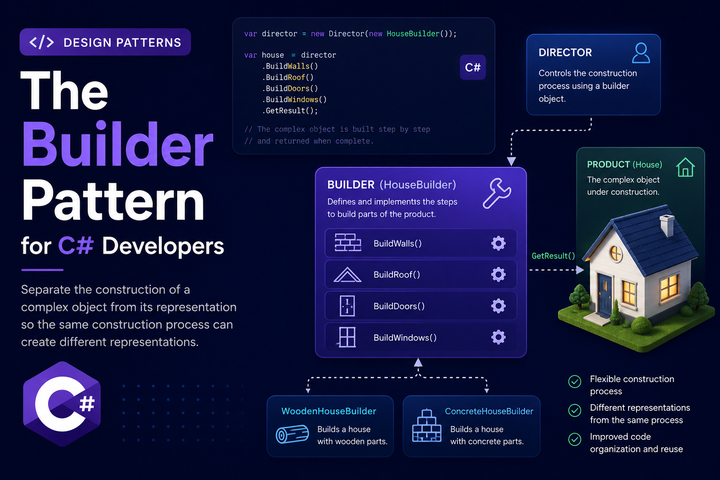
The Builder pattern is one of the most practical patterns for dealing with complex object construction. It lets you construct objects step-by-step, providing a clean alternative to telescoping constructors and long parameter lists. If you’ve ever used a fluent API like new StringBuilder().Append("Hello").Append(" ").Append("World").ToString(), you’ve seen the Builder pattern in action.
Let’s Define the Pattern
A builder is a class that constructs another object piece by piece. Instead of passing all parameters to a constructor, you call methods on the builder to set each property, then call a build method to create the final object. The builder handles the construction logic, keeping the object itself simple and often immutable.
The key idea is separation of concerns. The object being built focuses on what it is. The builder focuses on how it’s constructed. This separation makes complex construction logic easier to manage and test.
What a builder is not: it’s not a factory. Factories create objects in one step. Builders construct objects through multiple steps. Factories hide the type being created. Builders expose the construction process.
The Problem It Solves
Consider a House class that represents a house being constructed:
public class House
{
    public string Foundation { get; }
    public List<string> Walls { get; }
    public string Roof { get; }
    public List<string> Doors { get; }
    public List<string> Windows { get; }
    public bool HasGarage { get; }
    public bool HasGarden { get; }
    public string PaintColor { get; }
    public int SquareFootage { get; }
    public List<string> Rooms { get; }
}
Without a builder, you have two bad options.
Option 1: Telescoping constructors
public House(string foundation, List<string> walls) { }
public House(string foundation, List<string> walls, string roof) { }
public House(string foundation, List<string> walls, string roof, List<string> doors) { }
// ... and it keeps growing
This becomes unmanageable. Which constructor takes which parameters? What if you want to set HasGarden but not HasGarage? You end up with a combinatorial explosion of constructor overloads.
Option 2: One giant constructor
public House(
    string foundation,
    List<string> walls,
    string roof,
    List<string> doors,
    List<string> windows,
    bool hasGarage,
    bool hasGarden,
    string paintColor,
    int squareFootage,
    List<string> rooms) { }
Call sites become unreadable:
var house = new House(
    "Concrete",
    new List<string> { "North", "South", "East", "West" },
    "Shingle",
    new List<string> { "Front", "Back" },
    new List<string> { "Living Room", "Bedroom", "Kitchen" },
    true,
    false,
    "White",
    2000,
    new List<string> { "Living Room", "Kitchen", "Bedroom" });
Which parameter is which? What does that empty list mean? Is the square footage 2000 or something else? This is error-prone and hard to maintain.
Core Structure and Roles
The Builder pattern has three parts:
Product: The object being built. Often immutable to ensure it can’t be modified after construction.
public class House
{
    public string Foundation { get; }
    public List<string> Walls { get; }
    public string Roof { get; }
    public List<string> Doors { get; }
    public List<string> Windows { get; }
    public bool HasGarage { get; }
    public bool HasGarden { get; }
    public string PaintColor { get; }
    public int SquareFootage { get; }
    public List<string> Rooms { get; }

    private House(
        string foundation,
        List<string> walls,
        string roof,
        List<string> doors,
        List<string> windows,
        bool hasGarage,
        bool hasGarden,
        string paintColor,
        int squareFootage,
        List<string> rooms)
    {
        Foundation = foundation;
        Walls = walls;
        Roof = roof;
        Doors = doors;
        Windows = windows;
        HasGarage = hasGarage;
        HasGarden = hasGarden;
        PaintColor = paintColor;
        SquareFootage = squareFootage;
        Rooms = rooms;
    }
}
Builder: The class that constructs the product. It holds the construction state and provides methods to set each piece.
public class HouseBuilder
{
    private string _foundation = "Concrete";
    private readonly List<string> _walls = new();
    private string _roof = "Shingle";
    private readonly List<string> _doors = new();
    private readonly List<string> _windows = new();
    private bool _hasGarage;
    private bool _hasGarden;
    private string _paintColor = "White";
    private int _squareFootage = 1500;
    private readonly List<string> _rooms = new();

    public HouseBuilder BuildFoundation(string foundation)
    {
        _foundation = foundation;
        return this;
    }

    public HouseBuilder BuildWalls(params string[] walls)
    {
        _walls.AddRange(walls);
        return this;
    }

    public HouseBuilder BuildRoof(string roof)
    {
        _roof = roof;
        return this;
    }

    public HouseBuilder BuildDoors(params string[] doors)
    {
        _doors.AddRange(doors);
        return this;
    }

    public HouseBuilder BuildWindows(params string[] windows)
    {
        _windows.AddRange(windows);
        return this;
    }

    public HouseBuilder WithGarage()
    {
        _hasGarage = true;
        return this;
    }

    public HouseBuilder WithGarden()
    {
        _hasGarden = true;
        return this;
    }

    public HouseBuilder Paint(string color)
    {
        _paintColor = color;
        return this;
    }

    public HouseBuilder SetSquareFootage(int footage)
    {
        _squareFootage = footage;
        return this;
    }

    public HouseBuilder AddRooms(params string[] rooms)
    {
        _rooms.AddRange(rooms);
        return this;
    }

    public House Build()
    {
        if (_walls.Count == 0)
            throw new InvalidOperationException("House must have at least one wall");

        if (string.IsNullOrWhiteSpace(_roof))
            throw new InvalidOperationException("House must have a roof");

        return new House(
            _foundation,
            _walls,
            _roof,
            _doors,
            _windows,
            _hasGarage,
            _hasGarden,
            _paintColor,
            _squareFootage,
            _rooms);
    }
}
Client: The code that uses the builder to create the product.
var house = new HouseBuilder()
    .BuildFoundation("Concrete")
    .BuildWalls("North", "South", "East", "West")
    .BuildRoof("Shingle")
    .BuildDoors("Front", "Back")
    .BuildWindows("Living Room", "Bedroom", "Kitchen")
    .WithGarage()
    .WithGarden()
    .Paint("Blue")
    .SetSquareFootage(2500)
    .AddRooms("Living Room", "Kitchen", "Master Bedroom", "Guest Bedroom")
    .Build();
This is readable, self-documenting, and flexible. You can set only what you need, in any order, and the builder validates before construction.
Fluent Interface and Method Chaining
The fluent interface is what makes builders pleasant to use. Each builder method returns this, allowing method chaining:
public HouseBuilder BuildWalls(params string[] walls)
{
    _walls.AddRange(walls);
    return this; // Enables chaining
}
This is the key difference between a builder and a regular configuration object. With a regular object, you’d write:
var config = new HouseConfig();
config.Foundation = "Concrete";
config.Walls = new List<string> { "North", "South" };
config.Roof = "Shingle";
// ... more lines
var house = new House(config);
With a builder, the construction flows as a single expression. This isn’t just aesthetics—it makes the construction process feel like a single operation rather than a series of assignments.
Builder vs Similar Patterns
Builder vs Factory Method: A factory creates an object in one step. A builder constructs an object through multiple steps. Use a factory when construction is simple or when you want to hide the concrete type. Use a builder when construction is complex or when you want to expose the construction process.
Builder vs Abstract Factory: Abstract Factory creates families of related objects. Builder constructs a single complex object. If you need to create House and Garage and Shed together, that’s Abstract Factory. If you need to configure one House with many options, that’s Builder.
Builder vs Constructor with Named Parameters: C# doesn’t have named parameters for constructors (only for methods). Even if it did, builders offer validation logic, default values, and the ability to add items to collections. A constructor can’t add items to a list—builders can.
Builder vs Object Initializer: C# object initializers are great for simple cases:
var house = new House
{
    Foundation = "Concrete",
    Walls = new List<string> { "North", "South" }
};
But they require mutable properties and can’t enforce validation before construction. Builders can validate in Build() and keep the product immutable.
Validation and Required Fields
One of the builder’s strengths is validation. You can check that required fields are set before construction:
public House Build()
{
    if (_walls.Count == 0)
        throw new InvalidOperationException("House must have at least one wall");

    if (string.IsNullOrWhiteSpace(_roof))
        throw new InvalidOperationException("House must have a roof");

    if (_doors.Count == 0)
        throw new InvalidOperationException("House must have at least one door");

    return new House(...);
}
You can also validate business rules:
public House Build()
{
    if (_hasGarage && _squareFootage < 1000)
        throw new InvalidOperationException("Garage requires at least 1000 sq ft");

    if (_hasGarden && _walls.Count < 4)
        throw new InvalidOperationException("Garden requires at least 4 walls for proper fencing");

    return new House(...);
}
This validation happens once, in one place. Call sites don’t need to remember these rules—the builder enforces them.
Builder with Dependency Injection
Builders work well with DI, but they’re typically not registered in the container themselves. Instead, you might inject a factory that creates builders, or you instantiate builders directly where needed.
Factory approach:
public interface IHouseBuilderFactory
{
    HouseBuilder Create();
}

public class HouseBuilderFactory : IHouseBuilderFactory
{
    public HouseBuilder Create() => new HouseBuilder();
}

// Registration
services.AddSingleton<IHouseBuilderFactory, HouseBuilderFactory>();

// Usage
public class ConstructionService
{
    private readonly IHouseBuilderFactory _builderFactory;

    public ConstructionService(IHouseBuilderFactory builderFactory)
    {
        _builderFactory = builderFactory;
    }

    public House BuildHouse(HouseRequest request)
    {
        return _builderFactory.Create()
            .BuildFoundation(request.Foundation)
            .BuildWalls(request.Walls.ToArray())
            .BuildRoof(request.Roof)
            .Build();
    }
}
Direct instantiation (simpler, often preferred):
public class ConstructionService
{
    public House BuildHouse(HouseRequest request)
    {
        return new HouseBuilder()
            .BuildFoundation(request.Foundation)
            .BuildWalls(request.Walls.ToArray())
            .BuildRoof(request.Roof)
            .Build();
    }
}
Builders are lightweight and stateless, so direct instantiation is usually fine. Inject a factory only if you need to swap builder implementations (for testing or different construction strategies).
Testing with Builders
Builders make test setup much cleaner. Instead of long constructor calls in every test:
// Without builder - hard to read
var house = new House(
    "Concrete",
    new List<string> { "North", "South", "East", "West" },
    "Shingle",
    new List<string> { "Front", "Back" },
    new List<string> { "Living Room", "Bedroom" },
    false,
    false,
    "White",
    2000,
    new List<string> { "Living Room", "Kitchen", "Bedroom" });
You get readable test setup:
// With builder - clear and focused
var house = new HouseBuilder()
    .BuildFoundation("Concrete")
    .BuildWalls("North", "South", "East", "West")
    .BuildRoof("Shingle")
    .BuildDoors("Front")
    .Build();
You can also create helper methods for common test scenarios:
public static class HouseTestHelpers
{
    public static HouseBuilder CreateSimpleHouse()
    {
        return new HouseBuilder()
            .BuildFoundation("Concrete")
            .BuildWalls("North", "South", "East", "West")
            .BuildRoof("Shingle")
            .BuildDoors("Front");
    }

    public static HouseBuilder CreateHouseWithGarage()
    {
        return CreateSimpleHouse()
            .WithGarage()
            .SetSquareFootage(2000);
    }
}

// Usage
[Fact]
public void CalculatePrice_AppliesGarageSurcharge()
{
    var house = HouseTestHelpers.CreateSimpleHouse()
        .WithGarage()
        .SetSquareFootage(2000)
        .Build();

    // test...
}
Common Pitfalls and Code Smells
Mutable builders that get reused: A builder should be used once. After calling Build(), the builder’s state should be considered invalid. Reusing a builder can lead to subtle bugs where state carries over between constructions.
var builder = new HouseBuilder()
    .BuildFoundation("Concrete");

var house1 = builder.Build(); // Good

var house2 = builder.Build(); // Bad - same house configuration
Consider throwing an exception if Build() is called twice, or document that builders are single-use.
Builders that do too much: If your builder has complex business logic, conditional branching, or makes external calls, it’s doing too much. Builders should assemble data, not make decisions. Move complex logic into the product or a separate service.
Over-engineering simple objects: Not every class needs a builder. If an object has 2-3 properties, a constructor is fine. Builders add indirection—only use it when the construction complexity justifies the cost.
Inconsistent method naming: Be consistent with your fluent interface. If you use With for some methods, use it for all. Don’t mix With, Set, Add, Configure arbitrarily.
// Inconsistent
builder.BuildFoundation("Concrete")
       .SetRoof("Shingle")
       .AddDoor("Front")
       .ConfigureGarage();

// Consistent
builder.BuildFoundation("Concrete")
       .BuildRoof("Shingle")
       .BuildDoors("Front")
       .WithGarage();
Builders that expose internal state: If your builder has public properties or fields, callers can bypass the fluent methods and mutate state directly. Keep builder state private and only expose it through the fluent interface.
When Not to Use a Builder
For simple objects: If a class has 3-4 properties and they’re all required, a constructor is simpler and clearer.
When construction never varies: If every instance is created the same way with the same parameters, a builder adds no value.
When you need runtime type selection: If you’re choosing between different implementations at runtime, use a factory or abstract factory. Builders construct a specific type.
When performance is critical: Each method call is a virtual dispatch (if using interfaces) or at minimum a method call. In extremely hot paths creating millions of objects, this overhead might matter. Profile before optimizing.
Step Builder Pattern
For complex construction with required steps, consider the Step Builder pattern. This enforces that certain methods must be called in a specific order:
public interface IFoundationStep
{
    IWallsStep BuildFoundation(string foundation);
}

public interface IWallsStep
{
    IRoofStep BuildWalls(params string[] walls);
}

public interface IRoofStep
{
    IBuildStep BuildRoof(string roof);
}

public interface IBuildStep
{
    House Build();
}

public class HouseBuilder : IFoundationStep, IWallsStep, IRoofStep, IBuildStep
{
    // ... implementation

    public static IFoundationStep Create() => new HouseBuilder();

    private HouseBuilder() { }
}

// Usage - compiler enforces the order
var house = HouseBuilder.Create()
    .BuildFoundation("Concrete")           // Must be first
    .BuildWalls("North", "South", "East", "West")  // Must be second
    .BuildRoof("Shingle")                   // Must be third
    .Build();
This is overkill for most cases, but useful when construction has strict dependencies between steps.
Practical Guidelines
A few things to keep in mind:
- Name builder methods clearly.
BuildWallsis better thanWallsorSetWalls. The name should describe the construction action. - Make builders single-use. Either throw on reuse or document clearly that they’re not reusable.
- Validate in
Build(), not in each method. Let the caller set values in any order, then validate everything at the end. - Consider immutable products. Builders give you a clean construction phase—keep the product immutable after that.
- Provide sensible defaults. If a field has a common default value, set it in the builder so callers don’t have to.
- Keep builders focused. One builder per product. Don’t create a mega-builder that constructs multiple unrelated objects.
- Use the builder pattern when construction is complex. If you’re debating whether it’s worth it, it probably isn’t. The pattern should solve a real problem, not prevent a hypothetical one.
The Builder pattern is a practical solution to complex object construction. It eliminates telescoping constructors, makes call sites readable, and centralizes validation logic. Use it when you have complex objects with many optional parameters or when construction requires validation and business rules. Skip it when a simple constructor will do.

Alan P. Barber
Software Developer, Computer Scientist, Scrum Master, & Crohn’s Disease Fighter
I specialize in Software Development with a focus on Architecture and Design.