The Observer Pattern for C# Developers
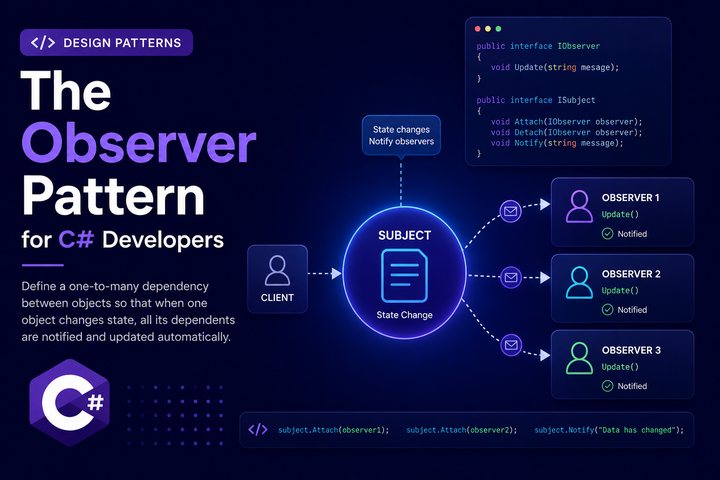
The Observer pattern is one of the most widely used patterns in software development. It shows up in UI frameworks, event systems, logging pipelines, and anywhere one change needs to trigger multiple reactions. Odds are you’ve already written code that uses it without calling it by name.
Let’s Define the Pattern
The Observer pattern defines a one-to-many relationship between objects. One object (the subject) changes state, and any number of objects (the observers) are notified automatically. The subject doesn’t know what the observers will do. It just broadcasts what happened.
What the Observer is not: it’s not a direct call chain where one thing calls another. The subject and observers are loosely coupled. The subject doesn’t import or depend on the observers. That’s the whole point.
C# has this built in through events and delegates. EventHandler, EventHandler<T>, Action, and Func are all expressions of this pattern. The .NET ecosystem runs on Observer-style event handling from UI to ASP.NET middleware pipelines.
The Problem It Solves
Say you have a UserAccountService. When a user registers, three things need to happen:
- Send a welcome email
- Write an audit log entry
- Run an initial security check
The direct approach is to call all three services from UserAccountService:
public class UserAccountService
{
    private readonly IEmailService _email;
    private readonly IAuditService _audit;
    private readonly ISecurityService _security;

    public UserAccountService(
        IEmailService email,
        IAuditService audit,
        ISecurityService security)
    {
        _email = email;
        _audit = audit;
        _security = security;
    }

    public async Task RegisterUserAsync(User user)
    {
        // save user to database...

        await _email.SendWelcomeAsync(user.Email, user.Name);
        await _audit.LogAsync("UserRegistered", user.Id);
        await _security.RunInitialCheckAsync(user.Id);
    }
}
This works. But UserAccountService now knows about email, auditing, and security. When the marketing team wants to subscribe new users to a newsletter, you edit UserAccountService. When the fraud team wants a new check added, you edit UserAccountService. The class accumulates knowledge of everything that reacts to user registration, and it never stops growing.
The Observer pattern flips this. UserAccountService announces that a user registered. Each interested party subscribes and reacts on its own.
Core Structure
Define an observer interface describing what observers can receive:
public interface IUserAccountObserver
{
    Task OnUserRegisteredAsync(User user);
}
The subject holds a collection of observers and notifies all of them when something happens:
public class UserAccountService
{
    private readonly IEnumerable<IUserAccountObserver> _observers;

    public UserAccountService(IEnumerable<IUserAccountObserver> observers)
    {
        _observers = observers;
    }

    public async Task RegisterUserAsync(User user)
    {
        // save user to database...

        foreach (var observer in _observers)
        {
            await observer.OnUserRegisteredAsync(user);
        }
    }
}
Each observer handles its own concern:
public class WelcomeEmailObserver : IUserAccountObserver
{
    private readonly IEmailService _email;

    public WelcomeEmailObserver(IEmailService email) => _email = email;

    public async Task OnUserRegisteredAsync(User user) =>
        await _email.SendWelcomeAsync(user.Email, user.Name);
}

public class AuditLogObserver : IUserAccountObserver
{
    private readonly IAuditService _audit;

    public AuditLogObserver(IAuditService audit) => _audit = audit;

    public async Task OnUserRegisteredAsync(User user) =>
        await _audit.LogAsync("UserRegistered", user.Id);
}

public class SecurityCheckObserver : IUserAccountObserver
{
    private readonly ISecurityService _security;

    public SecurityCheckObserver(ISecurityService security) => _security = security;

    public async Task OnUserRegisteredAsync(User user) =>
        await _security.RunInitialCheckAsync(user.Id);
}
Now UserAccountService has no direct knowledge of email, auditing, or security. Adding a new observer is a new class and a registration line. Removing one is just unregistering it. The core service never changes.
The C# Way: Events and Delegates
For simpler scenarios, C# events are the language-level version of this pattern. Instead of a list of observer objects, you use a delegate:
public class UserAccountService
{
    public event Func<User, Task>? UserRegistered;

    public async Task RegisterUserAsync(User user)
    {
        // save user to database...

        if (UserRegistered is not null)
        {
            await UserRegistered.Invoke(user);
        }
    }
}
Subscribers attach with +=:
userAccountService.UserRegistered += async user =>
    await emailService.SendWelcomeAsync(user.Email, user.Name);

userAccountService.UserRegistered += async user =>
    await auditService.LogAsync("UserRegistered", user.Id);
This works well for smaller, self-contained classes or when wiring things up procedurally. The main tradeoff is that subscriptions happen at the call site rather than through DI, which makes them harder to manage at scale. You also need to remember to unsubscribe when you’re done, or you’ll create memory leaks.
For application-layer logic with multiple observers managed through DI, the interface approach is cleaner. For local event handling within a single class or a UI component, events and delegates are more idiomatic.
Observer vs Related Patterns
Observer vs Mediator: A mediator centralizes communication between objects. The mediator knows about everyone. The Observer pattern keeps the subject ignorant of its observers. MediatR’s INotification is a mediator-style take on the same idea, with more infrastructure built in.
Observer vs Event Bus / Message Bus: An event bus is the Observer pattern with a transport layer. It can deliver events across processes or services. In-process Observer is simpler but doesn’t survive process restarts. If you need reliable delivery or cross-service events, a message bus (MassTransit, Azure Service Bus, etc.) is the right tool.
Observer vs Callback: A callback is a one-to-one relationship. One caller, one function to invoke. The Observer pattern supports many subscribers. They overlap in concept but differ in multiplicity.
Observer with Dependency Injection
.NET’s DI container makes registering multiple observers straightforward. Register each observer as an implementation of the same interface:
builder.Services.AddScoped<IUserAccountObserver, WelcomeEmailObserver>();
builder.Services.AddScoped<IUserAccountObserver, AuditLogObserver>();
builder.Services.AddScoped<IUserAccountObserver, SecurityCheckObserver>();
builder.Services.AddScoped<UserAccountService>();
When UserAccountService is resolved, the container injects all three implementations as IEnumerable<IUserAccountObserver>. Adding a new observer means a new class and one more AddScoped line. You don’t touch UserAccountService or any existing observer.
Testing
Test UserAccountService by passing mock observers and verifying all of them are called:
[Fact]
public async Task RegisterUser_NotifiesAllObservers()
{
    var observer1 = new Mock<IUserAccountObserver>();
    var observer2 = new Mock<IUserAccountObserver>();

    var service = new UserAccountService(new[] { observer1.Object, observer2.Object });

    await service.RegisterUserAsync(new User { Id = 1, Email = "test@example.com" });

    observer1.Verify(o => o.OnUserRegisteredAsync(It.IsAny<User>()), Times.Once);
    observer2.Verify(o => o.OnUserRegisteredAsync(It.IsAny<User>()), Times.Once);
}
Test each observer independently without involving the rest of the pipeline:
[Fact]
public async Task WelcomeEmailObserver_SendsEmailToRegisteredUser()
{
    var emailService = new Mock<IEmailService>();
    var observer = new WelcomeEmailObserver(emailService.Object);
    var user = new User { Email = "test@example.com", Name = "Test User" };

    await observer.OnUserRegisteredAsync(user);

    emailService.Verify(
        e => e.SendWelcomeAsync("test@example.com", "Test User"),
        Times.Once);
}
This isolation is one of the real benefits. Each observer is its own class with its own test. You never need to spin up UserAccountService to verify what WelcomeEmailObserver does.
Common Pitfalls and Code Smells
Memory leaks with raw events: When you subscribe with += and never unsubscribe with -=, the subject holds a reference to the subscriber. If the subject outlives the subscriber, the subscriber can’t be garbage collected. The DI-injected IEnumerable<T> approach avoids this because the container manages lifetimes.
Silent failures: If an observer throws and you don’t handle it, the exception may propagate and stop remaining observers from running. Decide upfront whether a failing observer should halt the chain or log and continue:
foreach (var observer in _observers)
{
    try
    {
        await observer.OnUserRegisteredAsync(user);
    }
    catch (Exception ex)
    {
        _logger.LogError(ex, "Observer {Observer} failed", observer.GetType().Name);
    }
}
Which behavior you want depends on your domain. An email failure probably shouldn’t block the security check. A critical audit failure might need to surface.
Observers that depend on each other: If SecurityCheckObserver needs something that AuditLogObserver wrote first, you have hidden ordering dependencies. Observers should be independent. If coordination is needed, a different pattern is better.
Overusing the pattern: Not every method call needs to be an event. If there’s only ever one reaction to something, just call it directly. The Observer pattern adds indirection. Indirection has a cost. Use it when the one-to-many relationship genuinely exists or is likely to grow.
When Not to Use It
When you need transactional guarantees: Observers run independently. If the second observer fails, the first one already completed. There’s no built-in rollback. For transactional consistency, handle reactions inside a database transaction or use an outbox pattern.
When you need durable delivery: In-process observers disappear if the application crashes. If you need guaranteed delivery across restarts or services, use a message bus.
When you already have MediatR: MediatR’s INotification and INotificationHandler<T> are the same idea with infrastructure already in place. If MediatR is in your stack, lean on it rather than rolling your own observer system.
When it’s one-to-one: If only one thing ever reacts to an event, a direct call is clearer and easier to follow.
Practical Guidelines
A few things worth keeping in mind:
- Name observer methods after what happened, not what to do.
OnUserRegisteredAsyncis better thanSendWelcomeEmailAsync. The subject shouldn’t know or care what observers will do with the event. - Keep observers focused. One observer, one concern. If
WelcomeEmailObserverstarts doing multiple things, split it. - Decide your error handling strategy early. Log and continue, or let failures propagate. Be consistent across the application.
- Prefer the
IEnumerable<T>injection pattern in DI-heavy applications. It’s simpler to manage than manually wiring up event handlers, and it removes the memory leak risk. - Consider MediatR or a message bus when your needs grow. Those tools are built for exactly this problem at scale, and they bring retry logic, pipeline behaviors, and registration scanning along with them.
The Observer pattern is the right tool whenever one thing happening needs to trigger multiple independent reactions. It keeps the subject focused, gives each reaction its own home, and makes adding or removing reactions a safe, isolated change.

Alan P. Barber
Software Developer, Computer Scientist, Scrum Master, & Crohn’s Disease Fighter
I specialize in Software Development with a focus on Architecture and Design.